If there will be any issues with respect to the connectivity, then the logs created under the directory as listed below:
Check out the Designer logs in for more details on the error you're seeing.
Client machine logs
C:\Documents and Settings\_Windows_Username_\ds_logs\dstage_wrapper_trace_N.log (where N cycles from 1 to 20, to give you the log files for the last 20 DataStage sessions)
Monday, April 26, 2010

tsortxxxxxx file size in Scratch directory
Question>
Is there any way how to influence the size of tsortxxxxx files that are created in the Scratch directory? We are running a PoC at the customer size and we have more than 70 mil records that has to be sorted. It leads to more than 5000 tsortxxxx files created in the Scratch directory. When these files are read in the next join stage, the performance is extremely slow because of necessity of access to this big directory. Each of the file has a size of approx. 10MB. Is there any way how to increase the file size and what are advantages and disadvantages of this approach?
Answer>
The size of the files are controlled through the use of the "Limit Memory" option in the Sort Stage. The default size is 20MB. What you are actually controlling is the amount of memory allocated to that instance of the sort stage on the node. The memory is used to buffer incoming rows and once full it is written to the sort work disk storage (in your case the Scratch directory). Increasing the size of the of the memory buffer can improve sort performance. 100-200MB is generally a decent compromise in many situations.
Advantages:
-- Larger memory buffer allows more records to be read into memory before being written to disk temporarily. For smaller files, this can help keep sorts completely in memory
-- The larger the memory buffer, the fewer i/o operations to the sort work disk and therefore your sort performance is increased. Also, a smaller number of files leads to fewer directory entries for the o/s to deal with
Disadvantages:
-- Larger memory buffer means more memory usage on your processing node(s). With multiple jobs and/or multiple sorts within jobs, this can lead to low memory and paging if not carefully watched.
-- This option is only available within the Sort stage...it is not available when using "link sorts" (sorting on the input link of a stage). If your job uses link sorts, you will have to replace them with Sort stages in order to use this option.
Be careful when tuning with this option so that you don't inadvertantly overtax system memory. Adjust and test and work towards a compromise that gives you acceptable performance without overloading the system.
Is there any way how to influence the size of tsortxxxxx files that are created in the Scratch directory? We are running a PoC at the customer size and we have more than 70 mil records that has to be sorted. It leads to more than 5000 tsortxxxx files created in the Scratch directory. When these files are read in the next join stage, the performance is extremely slow because of necessity of access to this big directory. Each of the file has a size of approx. 10MB. Is there any way how to increase the file size and what are advantages and disadvantages of this approach?
Answer>
The size of the files are controlled through the use of the "Limit Memory" option in the Sort Stage. The default size is 20MB. What you are actually controlling is the amount of memory allocated to that instance of the sort stage on the node. The memory is used to buffer incoming rows and once full it is written to the sort work disk storage (in your case the Scratch directory). Increasing the size of the of the memory buffer can improve sort performance. 100-200MB is generally a decent compromise in many situations.
Advantages:
-- Larger memory buffer allows more records to be read into memory before being written to disk temporarily. For smaller files, this can help keep sorts completely in memory
-- The larger the memory buffer, the fewer i/o operations to the sort work disk and therefore your sort performance is increased. Also, a smaller number of files leads to fewer directory entries for the o/s to deal with
Disadvantages:
-- Larger memory buffer means more memory usage on your processing node(s). With multiple jobs and/or multiple sorts within jobs, this can lead to low memory and paging if not carefully watched.
-- This option is only available within the Sort stage...it is not available when using "link sorts" (sorting on the input link of a stage). If your job uses link sorts, you will have to replace them with Sort stages in order to use this option.
Be careful when tuning with this option so that you don't inadvertantly overtax system memory. Adjust and test and work towards a compromise that gives you acceptable performance without overloading the system.
Tuesday, April 13, 2010
Triming to all Numeric
Question>
I have a phone number that has all kinds of special characters or alpha characters that can be mixed up in the field
I want to trim all of the non numeric characters out of the field
Anyone have any ideas as to how I can do this with out creating many stage variables to do the trim?
Answer>
StripWhiteSpace(Convert("ABCDEFGHIJKLMNOPQRSTUVWXYZabcdefghijklmnopqrstuvwxyz-.", Space(56), Input.String))
If you have extra characters, just increment the number of spaces as needed.
I have a phone number that has all kinds of special characters or alpha characters that can be mixed up in the field
I want to trim all of the non numeric characters out of the field
Anyone have any ideas as to how I can do this with out creating many stage variables to do the trim?
Answer>
StripWhiteSpace(Convert("ABCDEFGHIJKLMNOPQRSTUVWXYZabcdefghijklmnopqrstuvwxyz-.", Space(56), Input.String))
If you have extra characters, just increment the number of spaces as needed.
Truncating logging tables in XMETA
Question>
Our customer forgot to purge logs in DB so in several days
LOGGING_XMETAGEN_LOGGINGEVENT1466CB5F table growed to enormous size. They
switched to FS logging and set up log purging. Now they want to get rid of
the data in that table.
I think it will be safe enough to delete rows from there (using db load of
course) and they to reorginize it to free up the space. Table reorg will
drop the table and recreate it and this part worries me a bit. AFAIK there
are no foreign keys and if WAS is down, I don't think there will be a
problem to drop and recreate the table, but still ... What are the
official procedure to do this task?
I saw an email about using LoggingAdmin.sh and then reorg, but I wanted to
be sure that reorg (that will DROP the table) doesn't cause any problems
(it's production environment).
Answer>
You can use the purge function available in web console but this will take long time to finish for this data size
This is what i use to delete all logging events from xmeta table
1. Create an empty file "empty.id"
2. execute this command. File empty.id should be in this directory
db2 import from empty.id of del replace into xmeta.logging_xmetagen_loggingEvent1466cb5f
Our customer forgot to purge logs in DB so in several days
LOGGING_XMETAGEN_LOGGINGEVENT1466CB5F table growed to enormous size. They
switched to FS logging and set up log purging. Now they want to get rid of
the data in that table.
I think it will be safe enough to delete rows from there (using db load of
course) and they to reorginize it to free up the space. Table reorg will
drop the table and recreate it and this part worries me a bit. AFAIK there
are no foreign keys and if WAS is down, I don't think there will be a
problem to drop and recreate the table, but still ... What are the
official procedure to do this task?
I saw an email about using LoggingAdmin.sh and then reorg, but I wanted to
be sure that reorg (that will DROP the table) doesn't cause any problems
(it's production environment).
Answer>
You can use the purge function available in web console but this will take long time to finish for this data size
This is what i use to delete all logging events from xmeta table
1. Create an empty file "empty.id"
2. execute this command. File empty.id should be in this directory
db2 import from empty.id of del replace into xmeta.logging_xmetagen_loggingEvent1466cb5f
Trying to imrove performance generating a sorted seq file
Question>
I need to create a sorted seq file of about 31 millions of rows.
Running the sort stage sequentially (with 167 columns, 3 of them are the sort keys) takes about 3 hours and 10 minutes to land all the data.
Is there any technique I can use to boost the performance?
Answer>
just to inform you I was able to drop the elapsed of my test job from 3 hours to 1 hour for about 32 millions of rows
What I've done is:
1 . remove the length of varchar fields and decimal fields
2 . convert the decimal field to varchar but I've got the same throughput converting decimal fields to double, the problem was the output format.
3. create one big varchar field (without length) containing all the fields not part of the sort key
I need to create a sorted seq file of about 31 millions of rows.
Running the sort stage sequentially (with 167 columns, 3 of them are the sort keys) takes about 3 hours and 10 minutes to land all the data.
Is there any technique I can use to boost the performance?
Answer>
just to inform you I was able to drop the elapsed of my test job from 3 hours to 1 hour for about 32 millions of rows
What I've done is:
1 . remove the length of varchar fields and decimal fields
2 . convert the decimal field to varchar but I've got the same throughput converting decimal fields to double, the problem was the output format.
3. create one big varchar field (without length) containing all the fields not part of the sort key
RTLogging and ORLogging
With RTLogging = 1 you enable old fashion logging (on Universe) and you have to disable the repository logging (ORLogging = 0)
Question >
If i understand well, logs must be put in universe repository for job controls to operate correctly. Right?
What if the customer argues that migration to xmeta seems to be incomplete?
what if the customer wants logging in new repository and job controls to still operate?
Btw, it seems to me that it should work that way, no?
Answer>
No, the logs can be in either repository, and all APIs should work (give the same results) in either case. The RTLogging version is much faster and scales better - that should be the only difference
Question>
What is the pros & cons of ORLogging versus RTLogging?
Is it really because the repository cannot scale to support the ORLogging or we don't know the right setting. I believe DB2/Oracle can handle hundreds of thousands transactions per second with the right configuration.
Answer>
You are quite right about the database performance.
However, the implementation of ORlogging is not designed for performance. The actual table has many DBCLOB (double byte character large object) columns - and this is in reality preventing high performance.
As far as I know DB2 does not hold large object-tables in the buffer pool - so every update to such a table will trigger I/O - and waits.....
The DDL for the log table is:
CREATE TABLE "XMETA "."LOGGING_XMETAGEN_LOGGINGEVENT1466CB5F" (
"XMETA_CREATED_BY_USER_XMETA" VARGRAPHIC(64) ,
"XMETA_CREATION_TIMESTAMP_XMETA" BIGINT ,
"XMETAMODIFICATIONTIMESTAMPXMET" BIGINT ,
"XMETA_MODIFIED_BY_USER_XMETA" VARGRAPHIC(64) ,
"XMETA_OPTIMISTIC_LOCK_ID_XMETA" INTEGER ,
"XMETA_REPOS_OBJECT_ID_XMETA" VARCHAR(64) NOT NULL ,
"CATEGORYNAME_XMETA" VARGRAPHIC(255) ,
"CIS10_XMETA" VARGRAPHIC(255) ,
"CIS11_XMETA" VARGRAPHIC(255) ,
"CIS12_XMETA" VARGRAPHIC(255) ,
"CIS13_XMETA" VARGRAPHIC(255) ,
"CIS14_XMETA" VARGRAPHIC(255) ,
"CIS15_XMETA" VARGRAPHIC(255) ,
"CIS1_XMETA" VARGRAPHIC(255) ,
"CIS2_XMETA" VARGRAPHIC(255) ,
"CIS3_XMETA" VARGRAPHIC(255) ,
"CIS4_XMETA" VARGRAPHIC(255) ,
"CIS5_XMETA" VARGRAPHIC(255) ,
"CIS6_XMETA" VARGRAPHIC(255) ,
"CIS7_XMETA" VARGRAPHIC(255) ,
"CIS8_XMETA" VARGRAPHIC(255) ,
"CIS9_XMETA" VARGRAPHIC(255) ,
"CIT1_XMETA" DBCLOB(536870912) LOGGED NOT COMPACT ,
"CIT2_XMETA" DBCLOB(536870912) LOGGED NOT COMPACT ,
"CIT3_XMETA" DBCLOB(536870912) LOGGED NOT COMPACT ,
"CIT4_XMETA" DBCLOB(536870912) LOGGED NOT COMPACT ,
"CIT5_XMETA" DBCLOB(536870912) LOGGED NOT COMPACT ,
"CIT6_XMETA" DBCLOB(536870912) LOGGED NOT COMPACT ,
"CONTAINER_RID" VARCHAR(64) ,
"CONTEXT_XMETA" DBCLOB(536870912) LOGGED NOT COMPACT ,
"DELETED_XMETA" SMALLINT ,
"LEVEL_XMETA" INTEGER ,
"MESSAGE_XMETA" DBCLOB(536870912) LOGGED NOT COMPACT ,
"MSGID_XMETA" VARGRAPHIC(255) ,
"SEQ_XMETA" BIGINT ,
"THROWABLEINFO_XMETA" DBCLOB(536870912) LOGGED NOT COMPACT ,
"TIMESTAMP_XMETA" BIGINT )
IN "XMETA" ;
Question>
Does anyone have an exact customer scenarios that has ORLogging failed because of performance. How many logging events were being logged at the moment of poor performance?
workload description? is there a purging mechanism in place?. I would like to include the scenarios to test it for IS8.5.
Answer>
I had better answer this following my previous comments......... ;-)
November 2008 I installed v8.1 on a windows box (Windows Server 2003 Enterprise Edition). I don't remember the specs of the server - except that I am sure it had 16 GB memory.
Of the Information Server products only DataStage was installed (no Information Analyzer, no Business Glossary etc.).
The installation was similar to the client's other systems running v8.0.1 - and was tested with existing jobs.
A couple of server jobs (imported from an v7.5 export) threw a warning for every row during test. This made Director quite unresponsive, showing no log records for jobs in status finished if it responded at all. It turned out LOGGING_XMETAGEN_LOGGINGEVENT1466CB5F had around 800.000 rows. I deleted something like 780.000 records with:
delete FROM XMETA.LOGGING_XMETAGEN_LOGGINGEVENT1466CB5F where cis13_xmeta = 'MultiBomFinal'
MultiBomFinal was the job responsible for around half a million log records - logs for a couple of other jobs were deleted as well.
Following this I switched the installation to RTLogging.
While the technical solution was straight forward this did nothing to improve the client's impression of Information Server - and they were not too happy as it was (long story - mostly not our fault).
Question>
We have installed 8.1 at this client site and I have been here for a year. The response times has been pretty bad -- mainly due to the poor network at the client site.
I understand the difference between RTLogging and ORLogging -- thanks to techlist -- but we dont want to change it midway of this project and get into some unexpected problems.
Over a period of time the DEV system has over 1000 jobs and logging is set to ORLogging -- hence or otherwise we are noticing poor performance overall.
Since it is the dev system, we want to improve the performance and we dont care about saving old/previous logs.
Are there any steps to clear out the logs completely while maintaining it as ORLogging? I am hoping that doing that will improve the performance a little bit. Can somebody point me to the documentation relating to this?
Answer>
If you do not care about saving logs you can use either the web console or db2 sql commend to purge logs for the ORLogging setup
Using WebConsole
=================
1. Login to web console and navigate to Log Management/LogView as shown here. you should see the log view for your job else create one Bby clicking on New Log View
 2. Select the Log View that you use to view your OR logging events in xmeta and Click on "Purge Log" on the left navigation
3.Using sql
========
Here are steps to remove all rows in the logging table
as db2inst1 (Instance owner)
1) db2 "select count(*) from xmeta.LOGGING_XMETAGEN_LOGGINGEVENT1466CB5F"
record the number of rows in this table
2) create an empty file called empty.txt
3) db2 "import from empty.txt of del replace into xmeta.LOGGING_XMETAGEN_LOGGINGEVENT1466CB5F"
If you hit -964 then you need to increate logfilsize and increate LOGPRIMARY or cobination of both.
Question >
If i understand well, logs must be put in universe repository for job controls to operate correctly. Right?
What if the customer argues that migration to xmeta seems to be incomplete?
what if the customer wants logging in new repository and job controls to still operate?
Btw, it seems to me that it should work that way, no?
Answer>
No, the logs can be in either repository, and all APIs should work (give the same results) in either case. The RTLogging version is much faster and scales better - that should be the only difference
Question>
What is the pros & cons of ORLogging versus RTLogging?
Is it really because the repository cannot scale to support the ORLogging or we don't know the right setting. I believe DB2/Oracle can handle hundreds of thousands transactions per second with the right configuration.
Answer>
You are quite right about the database performance.
However, the implementation of ORlogging is not designed for performance. The actual table has many DBCLOB (double byte character large object) columns - and this is in reality preventing high performance.
As far as I know DB2 does not hold large object-tables in the buffer pool - so every update to such a table will trigger I/O - and waits.....
The DDL for the log table is:
CREATE TABLE "XMETA "."LOGGING_XMETAGEN_LOGGINGEVENT1466CB5F" (
"XMETA_CREATED_BY_USER_XMETA" VARGRAPHIC(64) ,
"XMETA_CREATION_TIMESTAMP_XMETA" BIGINT ,
"XMETAMODIFICATIONTIMESTAMPXMET" BIGINT ,
"XMETA_MODIFIED_BY_USER_XMETA" VARGRAPHIC(64) ,
"XMETA_OPTIMISTIC_LOCK_ID_XMETA" INTEGER ,
"XMETA_REPOS_OBJECT_ID_XMETA" VARCHAR(64) NOT NULL ,
"CATEGORYNAME_XMETA" VARGRAPHIC(255) ,
"CIS10_XMETA" VARGRAPHIC(255) ,
"CIS11_XMETA" VARGRAPHIC(255) ,
"CIS12_XMETA" VARGRAPHIC(255) ,
"CIS13_XMETA" VARGRAPHIC(255) ,
"CIS14_XMETA" VARGRAPHIC(255) ,
"CIS15_XMETA" VARGRAPHIC(255) ,
"CIS1_XMETA" VARGRAPHIC(255) ,
"CIS2_XMETA" VARGRAPHIC(255) ,
"CIS3_XMETA" VARGRAPHIC(255) ,
"CIS4_XMETA" VARGRAPHIC(255) ,
"CIS5_XMETA" VARGRAPHIC(255) ,
"CIS6_XMETA" VARGRAPHIC(255) ,
"CIS7_XMETA" VARGRAPHIC(255) ,
"CIS8_XMETA" VARGRAPHIC(255) ,
"CIS9_XMETA" VARGRAPHIC(255) ,
"CIT1_XMETA" DBCLOB(536870912) LOGGED NOT COMPACT ,
"CIT2_XMETA" DBCLOB(536870912) LOGGED NOT COMPACT ,
"CIT3_XMETA" DBCLOB(536870912) LOGGED NOT COMPACT ,
"CIT4_XMETA" DBCLOB(536870912) LOGGED NOT COMPACT ,
"CIT5_XMETA" DBCLOB(536870912) LOGGED NOT COMPACT ,
"CIT6_XMETA" DBCLOB(536870912) LOGGED NOT COMPACT ,
"CONTAINER_RID" VARCHAR(64) ,
"CONTEXT_XMETA" DBCLOB(536870912) LOGGED NOT COMPACT ,
"DELETED_XMETA" SMALLINT ,
"LEVEL_XMETA" INTEGER ,
"MESSAGE_XMETA" DBCLOB(536870912) LOGGED NOT COMPACT ,
"MSGID_XMETA" VARGRAPHIC(255) ,
"SEQ_XMETA" BIGINT ,
"THROWABLEINFO_XMETA" DBCLOB(536870912) LOGGED NOT COMPACT ,
"TIMESTAMP_XMETA" BIGINT )
IN "XMETA" ;
Question>
Does anyone have an exact customer scenarios that has ORLogging failed because of performance. How many logging events were being logged at the moment of poor performance?
workload description? is there a purging mechanism in place?. I would like to include the scenarios to test it for IS8.5.
Answer>
I had better answer this following my previous comments......... ;-)
November 2008 I installed v8.1 on a windows box (Windows Server 2003 Enterprise Edition). I don't remember the specs of the server - except that I am sure it had 16 GB memory.
Of the Information Server products only DataStage was installed (no Information Analyzer, no Business Glossary etc.).
The installation was similar to the client's other systems running v8.0.1 - and was tested with existing jobs.
A couple of server jobs (imported from an v7.5 export) threw a warning for every row during test. This made Director quite unresponsive, showing no log records for jobs in status finished if it responded at all. It turned out LOGGING_XMETAGEN_LOGGINGEVENT1466CB5F had around 800.000 rows. I deleted something like 780.000 records with:
delete FROM XMETA.LOGGING_XMETAGEN_LOGGINGEVENT1466CB5F where cis13_xmeta = 'MultiBomFinal'
MultiBomFinal was the job responsible for around half a million log records - logs for a couple of other jobs were deleted as well.
Following this I switched the installation to RTLogging.
While the technical solution was straight forward this did nothing to improve the client's impression of Information Server - and they were not too happy as it was (long story - mostly not our fault).
Question>
We have installed 8.1 at this client site and I have been here for a year. The response times has been pretty bad -- mainly due to the poor network at the client site.
I understand the difference between RTLogging and ORLogging -- thanks to techlist -- but we dont want to change it midway of this project and get into some unexpected problems.
Over a period of time the DEV system has over 1000 jobs and logging is set to ORLogging -- hence or otherwise we are noticing poor performance overall.
Since it is the dev system, we want to improve the performance and we dont care about saving old/previous logs.
Are there any steps to clear out the logs completely while maintaining it as ORLogging? I am hoping that doing that will improve the performance a little bit. Can somebody point me to the documentation relating to this?
Answer>
If you do not care about saving logs you can use either the web console or db2 sql commend to purge logs for the ORLogging setup
Using WebConsole
=================
1. Login to web console and navigate to Log Management/LogView as shown here. you should see the log view for your job else create one Bby clicking on New Log View
2. Select the Log View that you use to view your OR logging events in xmeta and Click on "Purge Log" on the left navigation3.Using sql
========
Here are steps to remove all rows in the logging table
as db2inst1 (Instance owner)
1) db2 "select count(*) from xmeta.LOGGING_XMETAGEN_LOGGINGEVENT1466CB5F"
record the number of rows in this table
2) create an empty file called empty.txt
3) db2 "import from empty.txt of del replace into xmeta.LOGGING_XMETAGEN_LOGGINGEVENT1466CB5F"
If you hit -964 then you need to increate logfilsize and increate LOGPRIMARY or cobination of both.
Wednesday, April 7, 2010
Searching Info Center - limiting the search scope doesn't work
Link
http://publib.boulder.ibm.com/infocenter/iisinfsv/v8r1/topic/com.ibm.swg.im.iis.common.ic.doc/common/iiypcmic_personalizing_table_of_contents.html
Personalizing the information center by narrowing the search scope
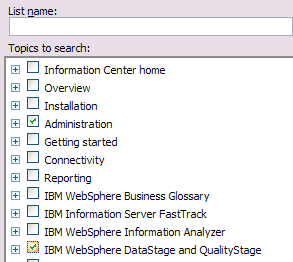
http://publib.boulder.ibm.com/infocenter/iisinfsv/v8r1/topic/com.ibm.swg.im.iis.common.ic.doc/common/iiypcmic_personalizing_table_of_contents.html
Personalizing the information center by narrowing the search scope
You can narrow the search scope by product or focus area. Narrowing the search scope is helpful if you are working with only a subset of the products or features. Follow these steps to search only specific sections, based on the organization in the Contents view.
To narrow the search scope:
- Click the Search scope (
 ) link next to the Search field. The Select Search Scope window opens.
 - Select Search only the following topics and click the New button. The New Search List window opens.
- In the List Name field, type a name for your search filter. The OK button remains unavailable until you provide a list name.
- In the Topics to search list, select the categories that you want to include in your search. You can expand categories to select only certain subcategories.
- Click OK.
- Click Search only the following topics.
- Select the search list that you created. Click OK.
- Enter your search terms in the Search field. The results are limited to your search list.
- To modify the search scope or to remove the search filter, click Search scope again and modify the filter.
The search list that is currently active is shown at the top of the information center, next to the Search scope link. The search list that you used most recently persists across sessions.

Subscribe to:
Posts (Atom)
